
Configure Email Alerts
A SMART System that is connected to the IoT Gateway can be configured to send immediate email alerts in response to several different conditions.
Before you begin
- The SMART IoT Gateway must be enabled in the SMART Control Panel Administration tab.
- If the SMART is on a network with a firewall, an IT administrator must open port 21578 to allow the SMART System to communicate with the email server.
About this task
The SMART System can send email alerts to any number of email addresses in response to the following conditions:
- The SMART Controller has rebooted.
- The available space on the SMART Controller's internal drive has fallen below a specified threshold.
- A SMART MIC-1 microphone's status registers as "missing."
- A microphone's measured sensitivity falls below a specified threshold, in dBFS.
With the exception of a Controller reboot, any of these statuses can trigger repeated alerts if the status does not clear after a specified interval.
Procedure
- Connect to the SMART Control Panel and go to Maintenance.
-
Under Email Alerts, specify email addresses to receive
the alerts.
Multiple email addresses should be separated by commas or semicolons.
-
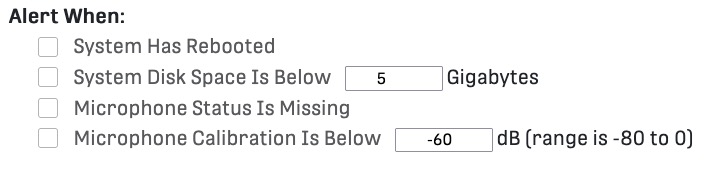
Select which of the available statuses should trigger an alert email, and edit
the corresponding thresholds for available disk space and microphone
calibration.
-
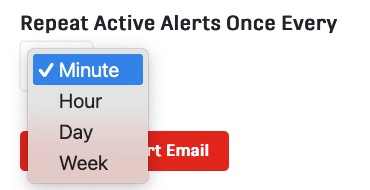
Select how often alert emails should repeat if the status has not
cleared.
-
Select Send Test Alert Email.
The email addresses you listed should receive a test message from
noreply@wildlifeacoustics.com. - Select Apply Changes, located at the top of the Maintenance tab.
What to do next
If you are integrating SMART with a SCADA System over OPC UA, any email alerts you enabled can also be published as OPC UA events. This requires copying the example smart-alerts-hook.sh script from /usr/local/share/smart to /var/www/html/storage.